Wednesday, 15 April 2015

The Design Process – a reflection to consider


Initial thoughts about starting the technology design challenge were not overly positive ones, I had preconceived ideas which were mostly negative. This is probably a common reaction from teachers who have not had the opportunity to really engage in the process and learn about the benefits for educating students today. We have an ever changing globalised world to educate children in and it’s important that their learning encompasses the best of this and teaches them how to deal with the everyday world they experience in a safe and exciting way. The technology design process does this! Immersing students in a project that excites them and educates them at the same time is powerful. The Design and Technologies and Digital Technologies curriculum focuses on creating students who are active and informed in sustainability, ethics, are socially responsible, can work collaboratively or individually, can critically analyse and think and have the ability to communicate on a number of different levels.

At the beginning of the process the planning phases can be a little arduous and drawn out if the students were to complete them all by themselves, however, it can be made fun and exciting and adapted to suit any age level. Simple planning sheets which are age appropriate could help to alleviate concerns that students may lose focus. I believe the whole design process whilst it has definite stages needs to be a very flexible and open ended process which can allow students to come up with a range of different solutions and ideas to address the initial challenge. Teachers need to make the design challenge age and experience appropriate and relevant to each classes context.

The design challenge process lends itself to both individual and collaborative learning and can easily foster both. Even though a challenge may be presented as individual work, using the peer feedback process involves students in a collaborative learning situation which can be beneficial on a number of levels. Peer feedback allows students to learn from each other, rather than just the teacher. Students will engage in meaningful discussions and provide each other with constructive comments about ways to improve a project whilst also finding the points that have been done well and celebrating successes. However, students still need to include constructive criticism in order to increase learning and engagement. Merely saying that everything is great does not extend learning and thinking and allow for growth in a project. It is important that this learning process is monitored closely to ensure students really understand its purpose and how to effectively and courteously take part in the process.

Taken from: http://technologygroup6.wikispaces.com/Rhiannan


Another critical component in the design process is being able to make informed and educated decision about the final project or solution. Educating students on how to do this gives them tools to be able to reason and justify their decisions, not only in their project but in their everyday decisions. The use of a decision making matrix is a great tool for students to have and use. In my design challenge I used an existing template and used it in a different way to suit my needs. However, throughout my readings and research I came across the following template which I feel provides a perfect example that could easily be incorporated into the classroom for student use.
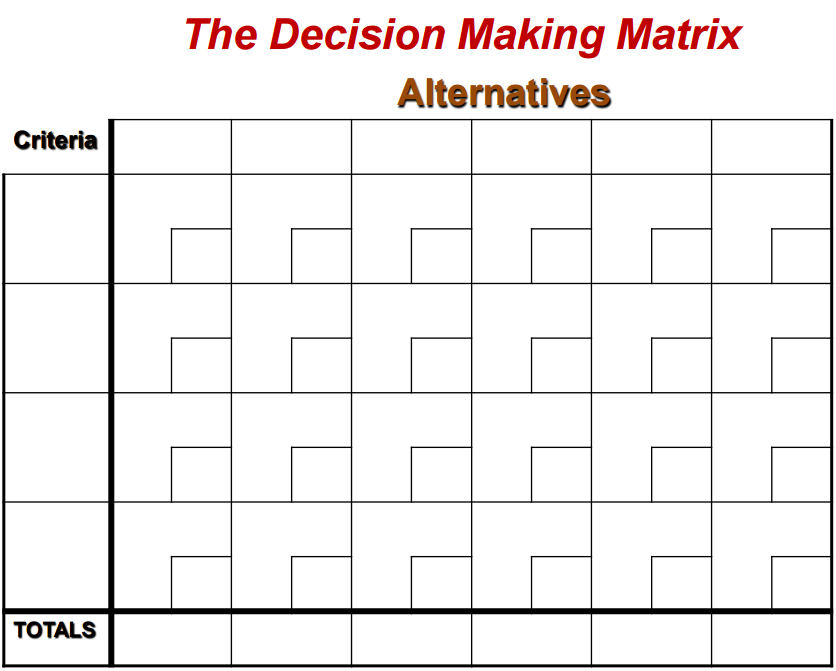

Taken from: Teepee Consulting. (2011) Higher Order Thinking for Gifted and Talented Students. [Powerpoint Slides]. Retrieved from https://moodle.cqu.edu.au/mod/page/view.php?id=13721.

Overall the technology design process provides students with immense benefits in their learning but does require teachers to adjust their teaching pedagogies. Teachers become more of a facilitator rather than dictator. Students need to be allowed to explore and investigate to create their own learning. Teachers will be required to carry out more forward planning to ensure the resources that students may need are available and depending on their imaginations and creativity this could be a lot or a little. Teachers will also have to adjust to the type of environment that students need in order to be creative, it may not always be an ordered, tidy classroom that facilitates creativity! For me this will be challenge in itself. It is important to allow students the freedom to explore and create their own understandings, and to experiment with this new found knowledge in order to learn how it is relevant to their world and can help them to create a better and more sustainable community. The answers will be in the solutions they uncover throughout their explorations.

Sunday, 12 April 2015

How do children learn about technology..... let's twitter

How do children learn about technology... well here are some thoughts about it from twitter.....


Children learn about technology by getting in there are really investigating about it, using it and exploring what it can do in their world.

When planning activities around technology teachers should use real world situations that allow students to discuss and investigate their surrounding communities. Hands on, creative situations should be developed in order to allow students to assimilate this new knowledge with existing schemas. Investigation and exploration will develop students understanding of technology, what it is and what it can do for us.

Twitter is an example of an avenue that allows student to communicate their thoughts in a concise and practical manner. Tweets have a limited number of characters (140), can be tracked using the hashtags and collected just as I have done above. This could allow for a whole class discussion to occur when and where students are able to. It gives them time to reflect on learning, investigate and then put their thoughts down on paper. Could it be embedded into a homework program....students must provide a tweet at the end of the day/week about their learning on particular topic covered in class????

    Decisions, decisions, decisions.....???????

    Sometimes making a final decision can be very difficult, especially when involved in group work. So how can that be done. Using a decision making matrix is the answer. Initially I thought this would be a very arduous process but I was wrong. Using a template such as this one....


    allows the users to comprehensively and accurately decide on the final choise for their projects in a matter of minutes.

    It requries students to
    • List in the columns the factors on which to base their decisions such as cost, size, purpose etc. 
    • On the left each row is labelled with the designs/solutions they are choosing from. 
    • Each factor must be given a raking from 1-5 (1= not important to 5=extremely important) and different factors can have the same value.
    • Each of the designs must then be given a ranking as to how well it demonstrates/reaches the factors.
    • Multiply each of the answers with the corresponding design and factors rankings to calculate an amount.
    • Add all the amounts in each row to obtain a total on the right hand side.
    Therefore, each row will calculate a score for each design and, in theory, the design/solution with the highest score is the best overall design and should be chosen to use. It is important to ensure that the factors are ranked properly acccording to the criteria you consider most and least important. If the design you thought should win, does not, maybe some of the criteria are ranked incorrectly.

    I did modify my use of the table slightly to have designs listed on every second row to allow for totals of each design to be shown in the same table rather than create the table a second time which showed the totals rather than the rankings. Mine have all been combined into the one table. I feel that this gives a simpler overview of things rather than swapping between two tables if changes needed to be made.

    Some of the benefits of using a decision making matrix include:
    • Unbiased opinions
    • Allows for matching comparisons of numerous design at the same time
    • Numerous factors can be accounted for in one matrix


    Design Process - the beginning.

    I think the design process is really aimed at creating interesting and creative classrooms and we know from research that this is best done through a collaborative approach. Creating small groups based on similar interests will spark student curiosity and giving them a project that they can really relate to and delve into. Initially I had thought that this project would be done individually but going through the process I think small groups will allow students to be more creative with each other and "bounce" ideas off each other. It will also allow for the collection of more materials for the final project between group members if required. This change in though has quite surprised me as I thought individual works would be more appropriate before beginning and reading my peer feedback.

    The peer feedback process has also surprised me! I began the process with a negative preconceived idea of how the process would fail...... My group members have open, honest and helpful. I think that working in groups online still generates a number of issues with reliability, completing tasks on time (I have failed at this over the last couple of weeks and know that feeling of letting my peers down) and sharing of work loads. However, in a classroom environment where all these facets can be monitored, managed and facilitated it should work well. Students will learn how to give constructive feedback. That is, being positive all the time is not going to help learning and negativity should also be left out. With the inclusion of ideas to support learning and praise for ideas which are well conceived.

    Tuesday, 17 March 2015

    Concept Mapping... the why and the how.

    What is concept mapping and why would students and teachers use it in the classroom. Surely it is time consuming and a waste of valuable classroom time that could be spent reciting maths facts.......

    WELL, I am hear to tell you that no that is not the case, it is most certainly a valuable tool in organising, planning, assessing and learning.

    Looking back at the history of concept mapping, Joseph Novak was a professor who understood the importance of this valuable tool back in the 1960's and has researched its benefits and value for the classroom and teacher. An article from Stanford University (http://web.stanford.edu/dept/SUSE/projects/ireport/articles/concept_maps/ConceptMapsOnlineLearningEnvironment.pdf) goes on to explain the theories, ideas and benefits of concept mapping which I have summarised below.

    What does a concept map look like?

    They contain ideas that are represented in circles or blocks with lines between them to show relationships.


    What are the advantages of using them?

    Online concept maps have a variety of advantages including:
    • they are easy to correct, manipulate or adapt
    • can be converted into multiple formats
    • can be sent to teachers, friends or peers for immediate feedback
    • shows levels of understanding for the particular concept

    What theories support the use of concept mapping tools to enhance learning?

    There are a number of theories that support these tools and Joseph Novak investigated the theories of David Ausubel in his Meaningful learning theory. This theory proposed that "learning new knowledge is dependent on what is already known. In particular, new knowledge gains meaning when it can be largely related to a framework of existing knowledge rather than being processed and stored in isolation according to more or less random criteria."

    Other theories include:-
    Dual coding theory which ensures that there is importance placed on both the verbal and non-verbal cues in the learning process. Therefore, as well as talking about new concepts or knowledge students also have a visual cue in the form of a concept map to assist with their learning.

    Schema theory supports the idea that students need to have prior information to associate new information with or create a new schema for new information. The use of a concept map in the classroom will help students associate information in the correct schema or help them generate new schemas to assimilate information.

    Cognitive load theory suggests that students can retain new information if there is an abundance of information to be learned at one time. Therefore, the concept map would assist teachers in planning lessons and curriculum content to be taught to ensure that information is passed on to students at an appropriate time and in conjunction with other relevant information.

    According to Novak, new concepts are acquired either by discovery learning or receptive learning. Discovery learning is the type of learning typically undertaken in the home and up to the time children begin formal schooling. Children are involved in a range of activities whereby they learn the skills they need to complete relevant tasks such as learning to communicate and investigating the world around them. Receptive learning is that which stereo-typically takes place in an educational setting whereby students are given information or concepts that they need to learn in a variety of content areas and contexts.


    How can teachers use it as a learning tool?

    The article from Stanford University states that "it serves as a template to aid in the organization and structuring of knowledge even though this knowledge is built up piece by piece." Concepts maps help students to put together a visual representation of their learning where they can relate all the bits of information together to develop deeper understanding of the layers involved with the concept they are learning.  They can clearly see relationships between new information and old. That is they can apply the information to the relevant schemas they have already developed and create new ones when necessary.

    Concept mapping tools also fit neatly within a constructivist approach to learning where the following seven principles are important:-

    1. Knowledge and beliefs are formed with the learner
    2. Learners personally imbue experiences with meaning
    3. Learning activities should cause learners to gain access to their experiences, knowledge and beliefs
    4. Learning is a social activity that is enhanced by shared inquiry
    5. Reflection and metacognition are essential aspects of constructing know;edge and meaning
    6. Learners play a critical role in assessing their own learning
    7. the outcomes of the learning process are varied and often unpredictable

    Can concept maps be used as an assessment tool as well as a learning tool?
    Absolutely. Concept maps can be used to follow and evaluate student learning while creating the documentation needed by teachers to support their marking or grading of students work. It is a great way for students to self assess or peer assess each other by looking for similarities and differences in their concept maps. This can also lead to discussion points where further learning and justification can take place. Teachers can use concept maps to see the depth of understanding  a student has in relation to a particular concept. It will also help to show misconceptions and the areas students are struggling with.

    For this to be an effective tool for assessment students must first understand the point and ways of working with concept maps, there must be a comparable "expert" example to mark from and a set of criteria for the marking. Stanford University describes three characteristics required for concept mapping to be used as an effective assessment tool:- 
    1. A task that requires students to give evidence of possession of knowledge structure of a domain.
    2. A format for student's response.
    3. A scoring system by which concept maps produced by students can be evaluated consistently and accurately.

    What about planning for the classroom?

    Teachers have a variety of methods at their disposal for planning and creating lessons. However, the benefits of using a concept map are numerous. They can be used individually or in groups and can track the ideas, key words, concepts, images needed or processes the teacher wants to use in the classroom. It also gives teacher the tools required to solve complex problems, to organise teaching content to ensure that all areas needed to be covered under the curriculum can be included in an orderly fashion without missing important components. It provides a comprehensive storage package for all media and content the teacher may require.

    SO, overall there are are a multitude of reasons to support the use of online concept maps as a teaching, planning, learning and assessing tool. The benefits seems endless and provide an interesting and effective tool to manage student learning.

    Monday, 9 March 2015

    Technology, Design, Curriculum...... How does it all fit together?

    The technologies curriculum is broken into two strands:

    • Design and Technologies
    • Digital Technologies
    These two areas combine to create a comprehensive technology program for students. Under the Design and Technologies strand we see a focus on helping students to consider sustainability, ethics and to develop a social responsibility for the future generations. Throughout the Digital Technologies content we see a shift towards computational thinking and using collaboration and communication to achieve a desired result.


    But.... what is technology?


    Technology has a been given a number of definitions over the years however, in today's educational context the definition described by Volti (2008) and written about by Jose Anazagasty (2014) is most appropriate. "A system produced by humans that employs knowledge and organisation to make objects and developed techniques for the specific achievement of goals."

    So we can see that technology is no longer just artefacts or items we can put our hands on but rather the combination of these items and the planning and processes that go with them in a social context. The social element is becoming increasingly important.

    So .... What pedagogy will be needed?


    Students will need to carry out a number of tasks and employ a range of strategies to develop a concrete understanding of the Technology Curriculum. Some of these skills can be described here.


    Design Thinking and Computational Thinking ... 

    What are the differences?

    Both types of thinking are centred on finding solutions to problems, but, the way students will go about finding these solutions will be very different when using these two approaches.

    Under the design thinking model students will use an exploratory or heuristic approach to finding a solution. Students will be given the opportunity to design, create innovative ideas, apply and evaluate these designs. All the while taking into consideration the effects on society and environment. Students will be able to design and redesign until the end goals are reached.

    Throughout the computational thinking process students will use strategies and techniques for problem solving that are basically algorithmic in nature. These processes basically involve collecting and organising data, breaking down issues and problems into components to be worked on by those with the specific skills to do so and looking for patterns and algorithms.

    What else is important?

    Higher order thinking has proven to be an effective tools in educating students and allowing them to develop a deeper understanding of their content. Robyn Collins outlines the importance of this in her article Skills for the 21st Century; teaching high-order thinking (http://www.curriculum.edu.au/leader/teaching_higher_order_thinking,37431.html?issueID=12910). Collins article goes further to explain three categories for higher order thinking:
    • Transfer - students not only need to learn new information but they also need to be able to apply this information in a real world context.
    • Critical Thinking - students need to be to take information they have gained and examine that information to decide if it is useful, truthful and relevant to the context they are working in.
    • Problem Solving - enables students to come up with solutions to a problem that requires more than just memorising facts or figures.
    Collins advises that there are many frameworks available to support the teaching of higher order thinking, however, Blooms is the most widespread. She also provides the following stages to help implement an effective program including higher order thinking:-

    • Specifically teach the language and concepts of higher order thinking
    • Planning classroom questioning and discussion time to tap into particular higher-order thinking skills
    • Explicitly teaching subject concepts
    • Providing scaffolding
    • Consciously teach to encourage higher order thinking